
Cute Calendar Family
This is just for you!
It is not only cute but it is a multi-use calendar!
You can create profiles as much as you want to then display it separately.One is for your schedule, the other is for your children and the third is for your job for example,you can use the calendar separately for each profile you create!It is very simple and has great functions!Open Cute Calendar, press Menu → More→Backup →Export SDcard to save the data.
Download free version of Cute Calendar Family, Menu → More→Backup → Import Cute Calendar to import your data for Family version.
Cute Calendar Family Manual
*Initial Window*Initial Window is Add Profile.
The second time and after you open Cute Calendar Family, the initial window is a calendar.
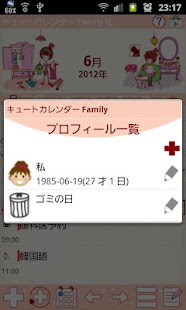
Let's start with making a list of profiles!
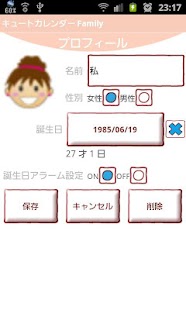
*How to make a profile*1.
Enter the name and select other information you need.2.
Tap the top-left button (camera with plus button) to select a photo or an icon for the profile.3.
Press "Save".
*How to switch the calendar for each profile*When you go back to the calendar after saving the profile, tap the photo or the icon on the calendar, move to "Profile List" to reselect the profile.
*Calendar*
1.
Calendar Mail: Send the image of the calendar by email.2.
Setting: You can select the images' height of the calendar etc… You can customize the calendar.
3.
Password: Set the password.4.
Mark: You can add marks on the calendar.5.
Alarm: Set the sound and volume.6.
More:Backup: Save the data to SD card.Setting Mark: You can customize the list of the mark.Copy to SD card: Copy SD card.Exit: Shut down the app.
1.You can see two images above the calendar.2.Tap the image you want to switch then 「Photo」pop-up window will be displayed.3.Select 「From album」or 「Camera」to switch.4.Delete the saved image with 「Clear」button.
1.「Add」button : Select the day → press Add button to create a new plan for the selected day.2.「Repeat」button: Create a repeated plans.3.「Today」button: Go back to the today's date.4.「Left」&「Right」button: Move the date right to left.5.「List」button: You can see saved plans on the list.6.「Note」: You can save memos.
There is a checkbox each note so you can use a memo as a todo list.
**How to save daily plans**1.
Press Add button of the calendar.2.
Move to the Plan Edit Window.
*Description of the Plan Edit Window*From the left-top window1.「Moveup」button: You can move saved plan to the previous day or before.2.「Putoff」button: You can move saved plan to the next day or later.3.「Check」button: Press this checkbox when you have done your plan, then a red checkmark will be displayed on the list of the calendar.
You can understand the plan has been done with one look.4.「Move Profile」: Tap this button to move the plan to another profile.5.「Delete」button: Delete the plan.
**How to save a daily plan**3.「Time」: Enter start and end time.4.「Title」: Enter the title of the plan.
This title will be displayed on the list of the calendar.5.「Memo」:You can save a memo for the plan.6.「Icon」: You can select an icon for each title.7.「Priority」:You can select the priority for the plan.8.「Photo」: You can save 2 photos a day.
9.
After entering all the data, press 「Back」button of the mobile then the plan will be saved automatically.10.
You can confirm saved plans on the list of the calendar.
About Cute Calendar Family
- Package name (App ID)
- info.androidx.lovelyfcalen
- Available on
- Google Play
- Price
- Free
- Version
- v1.1.73
- Developer
- GalleryApp
Looking for the Cute Calendar Family APK?
The safest way to get Cute Calendar Family (info.androidx.lovelyfcalen) on your Android device is to install it directly from Google Play — you'll always get the latest official version, automatic updates, and no risk of modified or infected APK files from third-party sites.
Music Features
Enjoy high-quality music streaming and playback features.
Gaming Features
Enjoy immersive gaming experience with various game modes.
Camera Features
Advanced camera features with editing capabilities.
See Cute Calendar Family in Action
Frequently Asked Questions
Is Cute Calendar Family free?
Yes, Cute Calendar Family is free to download and install on Android through Google Play.
How do I install Cute Calendar Family on Android?
Open Google Play on your Android phone or tablet, search for Cute Calendar Family by GalleryApp or tap the Google Play button on this page, then tap Install. The app downloads and installs automatically.
What is info.androidx.lovelyfcalen?
info.androidx.lovelyfcalen is the App ID (package name) of Cute Calendar Family on Google Play. Every Android app has a unique package name, and it is the safest way to verify you are installing the official app.
Is Cute Calendar Family safe to download?
Installing Cute Calendar Family from Google Play is the safest option: you get the official version published by GalleryApp, verified by Google Play Protect, with automatic updates. Avoid APK files from unofficial third-party sites.

Get Cute Calendar Family Today
Cute Calendar Family for Android — free download on Google Play.
Compatible with Android phones and tablets — available on Google Play.
Ask AI about this app
Get instant answers about features, tips and more from popular AI assistants.